CASE STUDY
Seroksan
Multi-tenant record-tracking SaaS for xerox shops
A system for Philippine xerox shops that also sell school supplies. It records every sale, checks the cash drawer and the machine counters at each shift, and shows owners what each branch really earned. I designed and built all of it on my own, from the database schema and API to the interface, tests and deployment pipeline.
- Role
- Solo developer, design to deployment
- Type
- Personal project
- Status
- Pre-launch hardening, November 2026
37
API modules
49
Database tables
3 / 34
Roles / permission codes
35
Test files
01.The problem
A xerox shop makes many small sales a day, often just a few pesos each, and they're easy to miss. If a job isn't written down, the owner has little to go on when the drawer comes up short, paper runs out early or a customer's credit is disputed.
A copier already keeps the evidence, though: its page counter. Seroksan compares those counts with the pages staff recorded, and the cash in the drawer with the money collected, at every shift. It also fits how these shops work, with per-page pricing, drop-off jobs, utang and GCash or Maya payments.
It's deliberately not a POS. It keeps the shop's own records and issues no official receipts, uses no OR or SI numbers and computes no VAT, so a shop's tax duties stay separate.
02.What it does
Counter
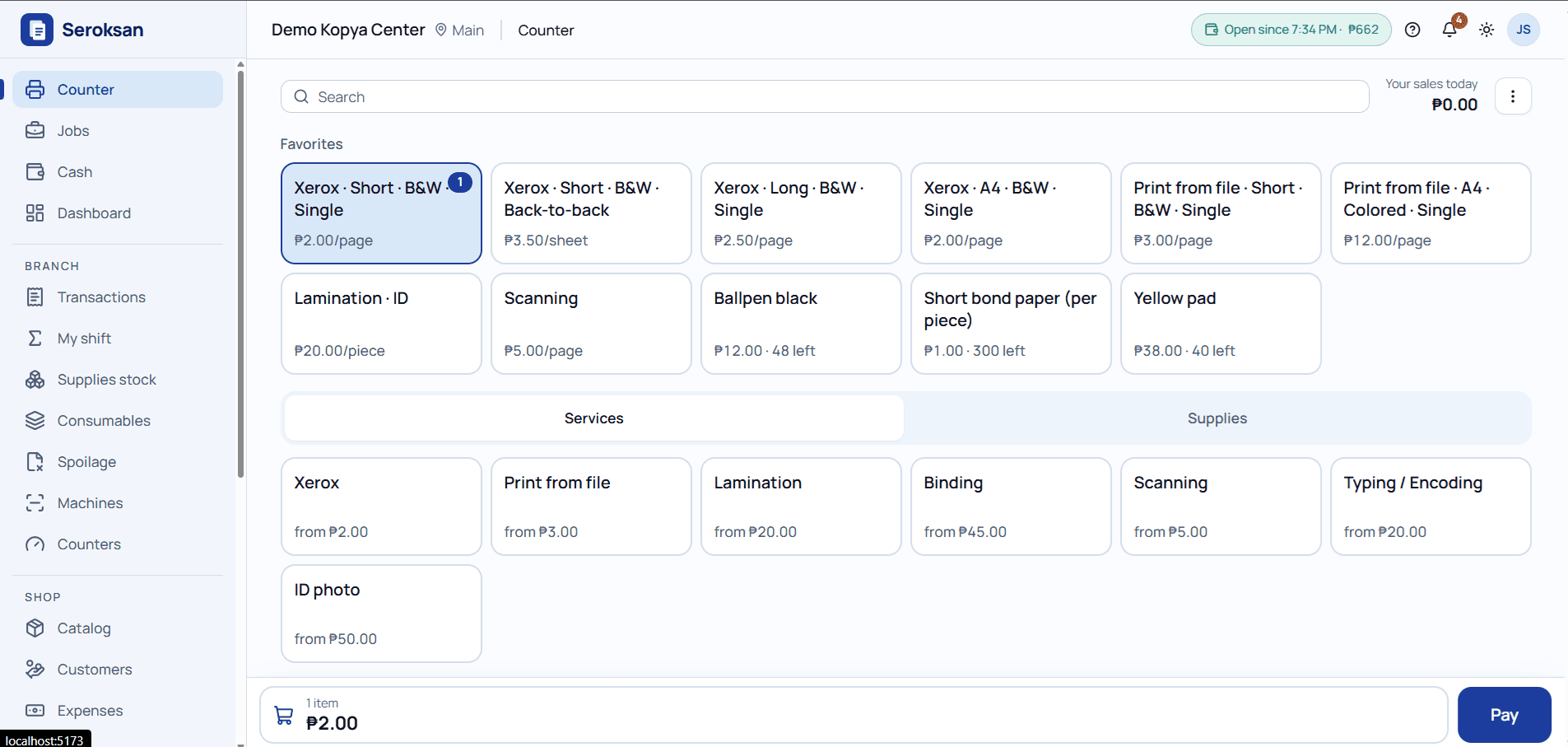
The screen staff use all day: favorite tiles, services and supplies, and a cart that's always in view. Each service has its own variants, such as size, color and sides, with volume price tiers. Payments can be cash, GCash, Maya or utang.
Shifts and cash
Each shift tracks the drawer from opening to close. Staff count the cash, and the shift shows Balanced, Over or Short. A difference outside the shop's tolerance waits for a Manager or the Owner to sign it off with a note.
Machine counters
Copiers and printers are read when a shift starts and closes, then compared with the pages recorded. An under-recorded gap shows its estimated value in pesos, and toner and ink installs are compared against their rated yield.
Stock and consumables
Each branch has its own stock of products and consumables, with stock-ins, adjustments, movement history and low-stock alerts. Paper and laminating film deduct with each sale, and spoilage logs deduct the same way.
Job orders and utang
Drop-off jobs move from Pending to In Progress, Ready and Claimed, and can take downpayments. Customers can buy on credit and pay part of it at any branch, with a ledger, statements and a list of who owes what.
Voids and audit
Staff ask to void a sale and give a reason, then a Manager or the Owner decides. Approval returns the stock and reverses the payment, and the sale stays on record. Every write adds a row to the audit log.
Dashboard and reports
A live owner dashboard, plus sales, expense and profit reports. Business plans add cross-branch reports and CSV export. Figures update on their own over Socket.IO, and a notification bell flags what needs attention.
Staff and counter devices
Owners create staff accounts that sign in with a shop code and username. On a registered counter device, staff switch in with a PIN, and a PIN session can't reach settings, billing, staff, branches or devices.
FREE
₱0
- 1 branch
- 2 users
- 500 transactions / mo
- 1 machine
PRO
₱249 / mo
- 1 branch
- 6 users, Manager role
- Job orders, utang
- Counter checks, profit reports
BUSINESS
₱699 / mo
- 5 branches
- 30 users
- Cross-branch reports
- Audit log, CSV export
03.How a shift balances
The shop is the tenant. It owns the plan, the catalog, the prices and the customers, while each branch keeps its own stock, machines and cash. Everything recorded at a branch lands in the shift that's open, and closing that shift runs two checks.
STRUCTURE
- Shop
- Branch
- Shift
- Sale
A SHIFT
- Open with cash and counters
- Record sales
- Count the drawer
- Read the counters
- Review and close
CASH CHECK
Expected = opening + cash payments + cash-ins − payouts
Compared with the count: Balanced, Over or Short. GCash, Maya and utang never touch the drawer.
COUNTER CHECK
Machine pages vs sales + Ready jobs + spoilage
OK within 5 pages or 1% by default, whichever is bigger. Color pages are checked against color copies only.
Every query filters by shop. Outsiders get a 404.
Owner, Manager and Staff map to 34 permission codes, and staff reach only the branches they're assigned to
04.Engineering decisions
Sales are never edited
A mistake is voided, not changed. Approving a void is the only code that updates a sale, and a contract test enforces that. The one exception clears a sale's free-text fields when a shop is deleted. A database trigger also rejects any UPDATE or DELETE on the audit log.
A retry can't record a sale twice
The counter screen gives each sale its own request id, and the database keeps it unique per shop. If a sale is sent again, the API returns the first one, even if the shift has since closed or the plan has hit its cap.
The server always sets the price
The API works out every price again from one pure function, and the UI keeps a checked copy of it for instant totals. If the catalog changed after the screen loaded, the sale is refused with a 409 rather than saved at a price nobody saw.
Closed shifts stay closed
Once a shift closes, its figures and counter check are frozen. A sale voided later appears as a post-close adjustment in the shift where the void was approved, so a count an owner already reviewed never moves.
No false alarms from the counter check
Recorded pages belong to the whole shift and can't be split per machine. If a machine is left out, say after a counter reset, the shift shows Not compared instead of a misleading over-recorded result.
A lapsed plan never stops the shop
Recording sales is never blocked by an unpaid plan, and a shop can still collect what it's owed. Only Free's monthly transaction cap can refuse a sale. Unpaid plans get a 7-day grace period, and nothing is deleted.
05.Testing
These records settle questions about money, so the rules have to hold on every route, including ones added later. Alongside its feature tests, the API's Vitest and Supertest suite has contract tests that check those rules across the whole API.
- ▸Tests run in-process against a real PostgreSQL database and a real Redis. Only Cloudinary, PayMongo and Resend are mocked.
- ▸A route coverage guard fails the suite if any route has no test, and a permissions suite fails it if a route has no permission check.
- ▸A tenant-isolation suite covers both shops and branches, sending ids that belong to someone else and expecting a 404.
- ▸Contract tests also fail the suite on a query that skips the shop filter, a write with no audit row, or a cache prefix with no invalidator.
- ▸The API and UI copies of the pricing rule must pass the same set of cases, so they can't drift apart.
06.Tech stack
- TypeScript
- Express 5
- React 19 (Vite)
- TanStack Router, Query & Table
- Base UI
- Tailwind CSS
- PostgreSQL
- Drizzle ORM
- Redis
- Socket.IO
- Cloudinary
- PayMongo
- Resend
- Zod
- Vitest
- Docker
- Caddy
- Nginx
- Sentry
The public pages (landing, pricing, terms, privacy) are prerendered so they load before any script runs, and the app installs as a PWA on the counter's phone or tablet. The deployment pipeline runs Docker containers behind Caddy, with a health check, automatic rollback and a script that test-restores backups. I've rehearsed it locally, and the first production deployment comes next.
Running on paper and guesswork?
I build business systems end to end: the records, the checks and the tests that keep them correct. Let's talk about yours.